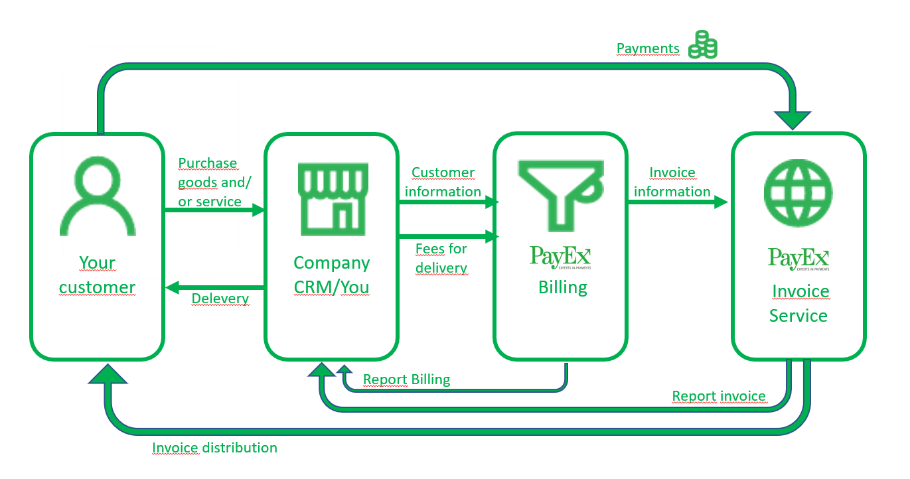
PayEx Billing accumulates submitted fees and products and creates an invoice for these fees and products. PayEx Billing also can help you to account your revenue, which will unlock time and resources for your business. You send your invoice information to us and PayEx Billing will take care of the rest!
This documentation targets technical system integrators and developers implementing PayEx Billing service.
You send customer and invoice information via a text-based KUB file and product file. If you have call traffic or other usage, you also send it to us and we will compile it on the next invoice.
After invoicing, PayEx Billing can deliver XML files for accounting.
| PayEx Billing | Supporting the following features |
|---|---|
|
|
Structure of this documentation
This documentation contains several parts, as described below.
Implementation guide
How to implement Billing parts of PayEx Invoice service
Technical glossary
Translation of technical concepts (eng-swe) in PayEx Billing.
Technical reference
Overview of the technical documentation for API and file interfaces presenting file specifications for input files, receipts, errors, and example files.
Billing API
API specifications for calls to PayEx Billing
Usage
Specification for calls to the Billing Usage API to retrieve unbilled and billed items associated with each subscription
Billing File
Technical documentation for file interfaces presenting file specifications for input files, receipts, errors, and example files.
Customer information
Describes the details of how customer information/invoice details are sent and which return files are created.
Fees and Products
bla
Invoice
bla
Reports Billing
Reports that are created during the billingprocess.
Revenue Accounting
bla
Usage
bla