Integrate to PayEx Billing Invoice API
Changelog
| Version | Date | Description | Created by |
|---|---|---|---|
| 1.0 | 2025-05-20 | Created document | Anders Göthberg |
| 1.1 | API in production | Anders Göthberg |
Introduction
A link to the general step-by-step implementation guide for setting up a REST API integration with PayEx Ledger Invoice Service can be found here
The Billing Invoice API provides a detailed, line-level view of all incoming charges that contribute to an invoice, regardless of how they are presented in the PDF version. This data can be used for display in various company applications, such as customer self-service portals ("My Pages") or by customer service representatives within the company's CRM system.
Invoice API
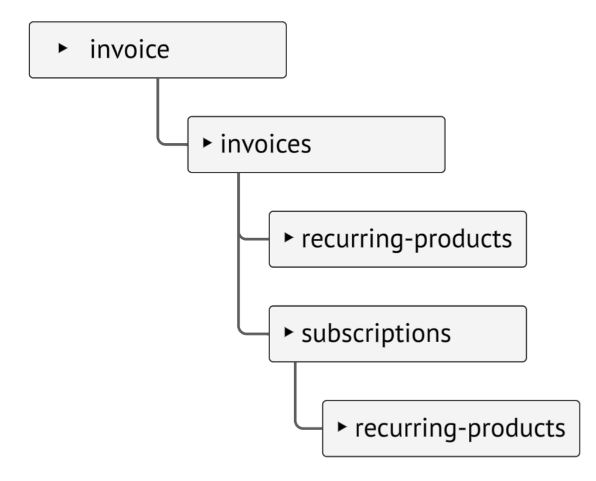
Route description
Each resource in the API is mapped to its own route. All routes follow a consistent structure based on a defined standard, which is described below.
The below route is an example of a route towards resource3Id. To operate on this resource, you must also include the IDs of its parent resources in the route.
lf-api.payex.com/billing/{subdomain}/v1/{ownerNo}/resource1/{resource1Id}/resource2/{resource2Id}/resource3/{resource3Id}
| Route segment | Description |
|---|---|
| subdomain | In this part of the API it will be "billing" |
| ownerNo | The ledger identifier/number at PayEx |
| resource1Id | Identifier of resource1 (invoices) |
| resource2Id | identifier of resource2, subresource to resource1 (customer recurring products or subscriptions) |
| resource3Id | identifier of resource3, subresource to resource2 (subscription recurring products) |
Routes that occurs in examples of this documentation will use the following identifiers
| Resource | Identifier |
|---|---|
| ownerNo | The ledger identifier/number at PayEx |
| customerNo | Customer number |
| invoiceNo | Invoice number |
| subscriptionNo | Subscription number (identifier for subscription) |
| recurring-products | Recurring products on customer or subscription level |
1. Invoices
Lists invoices
1.1 Get list of Invoices
Host: -
Authorization: Bearer<Token>
Content-Type: application/json
Content-Type: application/json
{
"items": [
{
"invoiceNo": "603010",
"invoiceDate": "2026-03-01",
"recurringProducts": "/billing/invoice/v1/xxx/invoices/603010/recurring-products",
"subscriptions": "/billing/invoice/v1/xxx/invoices/603010/subscriptions",
"@id": "/billing/invoice/v1/xxx/invoices/603010"
},
{
"invoiceNo": "603012",
"invoiceDate": "2026-04-01",
"recurringProducts": "/billing/invoice/v1/xxx/invoices/603012/recurring-products",
"subscriptions": "/billing/invoice/v1/xxx/invoices/603012/subscriptions",
"@id": "/billing/invoice/v1/xxx/invoices/603012"
}
],
"navigation": {
"@id": "/billing/invoice/v1/xxx/invoices"
}
}
Get invoice
1.2 Get specific Invoice
Host: -
Authorization: Bearer<Token>
Content-Type: application/json
Content-Type: application/json
{
"invoiceNo": "603010",
"invoiceDate": "2026-03-01",
"invoiceAmount": 499.00,
"recurringProducts": "/billing/invoice/v1/xxx/invoices/603010/recurring-products",
"subscriptions": "/billing/invoice/v1/xxx/invoices/603010/subscriptions"
}
Response object specification
| Property | Data type | Format | Description |
|---|---|---|---|
| @id | string | Uri identifier of the current resource | |
| invoiceNo | string | Invoice number | |
| invoiceDate | string | Invoice date | |
| invoiceAmount | number | Type: double | Total invoiced amount |
| recurringProducts | dynamic | Invoiced recurring products on customer level | |
| subscriptions | dynamic | Invoiced subscriptions |
2. Recurring-products
Lists recurring products on customer level
2.1 Get list of Recurring-products
Host: -
Authorization: Bearer<Token>
Content-Type: application/json
The resource is used to get a list of recurring products
Content-Type: application/json
{
"items": [
{
"baseProductCode": "P01",
"text": "Helförsäkring",
"startDate": "YYYY-MM-DD",
"endDate": "YYYY-MM-DD",
"amount": 0
},
{
"baseProductCode": "P02",
"text": "Halvförsäkring",
"startDate": "YYYY-MM-DD",
"endDate": "YYYY-MM-DD",
"amount": 0
}
],
"navigation": {
"@id": "/billing/invoice/v1/xxx/invoices/224455/recurring-products"
}
}
Response object specification
| Property | Data type | Format | Description |
|---|---|---|---|
| @id | string | Uri identifier of the current resource | |
| baseProductCode | string | Base product code | |
| text | string | Presented product text | |
| startDate | string | Product start date | |
| endDate | string | Product end date | |
| amount | number | Type: double | The invoiced amount of the product |
3. Subscriptions
Lists subscriptions on customer
3.1 Get list of Subscriptions
Host: -
Authorization: Bearer<Token>
Content-Type: application/json
Content-Type: application/json
{
"items": [
{
"subscriptionNo": "MF1122334455",
"name": "Lätt lastbilsförsäkring, ABC123",
"recurringProducts": "/billing/invoice/v1/xxx/invoices/224455/subscriptions/mf1122334455/recurring-products",
"@id": "/billing/invoice/v1/xxx/invoices/224455/subscriptions/mf1122334455"
},
{
"subscriptionNo": "CV9988774455",
"name": "Fritidshusförsäkring",
"recurringProducts": "/billing/invoice/v1/xxx/invoices/224455/subscriptions/cv9988774455/recurring-products",
"@id": "/billing/invoice/v1/xxx/invoices/224455/subscriptions/cv9988774455"
}
],
"navigation": {
"@id": "/billing/invoice/v1/xxx/invoices/224455/subscriptions"
}
}
Get specific subscription
3.2 Get specific Subscription
Host: -
Authorization: Bearer<Token>
Content-Type: application/json
Content-Type: application/json
{
"subscriptionNo": "MF1122334455",
"name": "Lätt lastbilsförsäkring, ABC123",
"recurringProducts": "/billing/invoice/v1/xxx/invoices/224455/subscriptions/mf1122334455/recurring-products"
}
Response object specification
| Property | Data type | Format | Description |
|---|---|---|---|
| @id | string | Uri identifier of the current resource | |
| subscriptionNo | string | Subscription identifier | |
| name | string | Subscription name | |
| recurringProducts | dynamic | Invoiced recurring products on selecte subscription level |
4. Recurring-products
Lists subscription recurring products
4.1 Get list of Recurring-products
Host: -
Authorization: Bearer<Token>
Content-Type: application/json
The resource is used to get a list of subscription recurring products
Content-Type: application/json
{
"items": [
{
"baseProductCode": "P03",
"text": "Trafikförsäkring",
"startDate": "YYYY-MM-DD",
"endDate": "YYYY-MM-DD",
"amount": 0
},
{
"baseProductCode": "P04",
"text": "Halvförsäkring",
"startDate": "YYYY-MM-DD",
"endDate": "YYYY-MM-DD",
"amount": 0
}
],
"navigation": {
"@id": "/billing/invoice/v1/xxx/invoices/224455/subscriptions/2010101010/recurring-products"
}
}
Response object specification
| Property | Data type | Format | Description |
|---|---|---|---|
| @id | string | Uri identifier of the current resource | |
| baseProductCode | string | Base product code | |
| text | string | Presented product text | |
| startDate | string | Product start date | |
| endDate | string | Product end date | |
| amount | number | Type: double | The invoiced amount of the product |
Problems
All errors from the api are returned in the form of "problems" (response body), except for the http status code itself.
The problem object contain more detailed info on what the error is. The "type" property can be used to programmatically interpret the error as it contains a code definition of the problem.
Other properties can be useful for logging and subsequent troubleshooting. Some problems are extended with additional parameters so it may be a good idea to log response body as raw data to include these.
Problems of type validation does contain an additional list ("Problems") that describes exactly which parameter that failed the validation
Example
Content-Type: application/problem+json
{
"Type" : "ledger/{domain}/v1/problems/validation",
"Title" : "A validation error occurred",
"Status" : 400,
"Instance" : "215d4206-ca35-4f43-85ad-169c8f6d4ec1",
"Detail" : "A validation error occurred. Please fix the problems mentioned in the 'problems' property below.",
"Problems" :
{
"amount" : [
"Expected value between [0,01]-[79228162514264337593543950335] actual [0]"
]
}
}
Problem types
| Problem type (code) | Http status | Description |
|---|---|---|
| validation | 400 | occurs if any of the input validation fails, it is described in the problem which parameter that failed the validation |
| customer-not-found | 404 | Customer not found in PayEx Billing |
| invoice-not-found | 404 | Invoice number not found in Usage |
| subscription-not-found | 404 | Subscription not found on selected customer |