Draft:
Integrate to PayEx Account transaction API
Changelog
Introduction
The account-transaction API is handle payment flows for credit accounts for retail finance scenarios. The api contains redirect scenarios for account onboarding and upgrades.
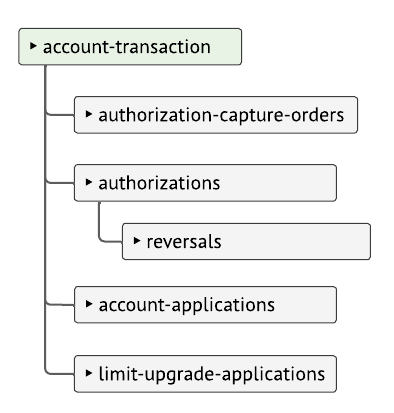
1. Authorization-capture-orders
Get an existing authorization-capture-orders. The authorization-capture-orders, is used when adding transactions to users account when user is pre identified.
1.1 Get specific Authorization-capture-order
Host: -
Authorization: Bearer<Token>
Content-Type: application/json
Success Example
Response for a successful authorization and capture
Content-Type: application/json
{
"status": "processed",
"callbackBody": {
"success": {
"authorization": "/ledger/account-transaction/v1/XXX/authorizations/{authorizationId}"
}
},
"captureId": "123456",
"authorizationId": 123456789,
"accountNo": "1234",
"callbackUrl": "https://my.com/callback?543245892u59",
"sellerReferenceId": "abc-87465123",
"sellerTransactionId": "654789312",
"authenticationMethod": "2FA",
"currency": "SEK",
"amount": 50.00,
"pointOfSale": "Test shop",
"@id": "/ledger/account-transaction/v1/xxx/authorization-capture-orders/123456",
"operations": []
}
Error Example
Response for a unsuccessful authorization or capture
Content-Type: application/json
{
"status": "processed",
"callbackBody": {
"fail": {
"type": "ledger/account-transaction/v1/problems/validation",
"title": "Not found",
"status": 404,
"detail": "A validation error occurred. Please fix the problems mentioned in the \u0027problems\u0027property below.",
"instance": "215d4206-ca35-4f43-85ad-169c8f6d4ec1"
}
},
"captureId": "123456",
"authorizationId": 123456789,
"accountNo": "1234",
"callbackUrl": "https://my.com/callback?543245892u59",
"sellerReferenceId": "abc-87465123",
"sellerTransactionId": "654789312",
"authenticationMethod": "2FA",
"currency": "SEK",
"amount": 50.000,
"pointOfSale": "Test shop",
"@id": "/ledger/account-transaction/v1/xxx/authorization-capture-orders/123456",
"operations": []
}
1.2 Create Authorization-capture-order
Create authorization-capture-orders is used to add transaction when user is not online.
Host: -
Authorization: Bearer<Token>
Content-Type: application/json
{
"captureId": "123456",
"authorizationId": 123456789,
"accountNo": "1234",
"callbackUrl": "https://my.com/callback?543245892u59",
"sellerTransactionId": "654789312",
"authenticationMethod": "2FA",
"currency": "SEK",
"amount": 50.00,
"pointOfSale": "Test shop"
}
| Property | Data type | Format | Required | Description |
|---|---|---|---|---|
| captureId | string | Yes | Identifier of the capture, must be unique for all types of captures within the ledger | |
| authorizationId | integer | Yes | Identifier of the authorization, must be unique for all types of authorizations within the ledger | |
| accountNo | string | Yes | The identifier of the account | |
| callbackUrl | string | No | If callback should be done on status change, it is done to the callback url. If empty no callback is done. | |
| sellerNo | string | Yes | The seller identifier at payex | |
| sellerReferenceId | string | Pattern: ^[a-zA-Z0-9_:!"#<>=?\[\]@{}´ %-/À-ÖØ-öø-ú]*$ | Yes | Sellers referenceid, usually the orderid of the purchase / consistent for all captures/deliveries. Use only alphanumeric characters and/or underscore |
| sellerTransactionId | string | Yes | The sellers identifier of the capture/transaction, usually the receipt reference | |
| authenticationMethod | string | Yes | Authentication method used to identify the user. Possible values 1FA (one factor),2FA (two factor) ,3FA (three factor) | |
| currency | string |
| Yes | |
| amount | number | Pattern: ^\d+.\d{0,2}$ Max: 100000000 Min: 0 | Yes | The amount of the authorization capture order, can't have more than 2 decimal places. |
| pointOfSale | string | No | Trade name of the point of sale. Will be displayed to end customer. Only use if agreed with PayEx. |
Content-Type: application/json
{
"status": "pending",
"captureId": "123456",
"authorizationId": 123456789,
"accountNo": "1234",
"callbackUrl": "https://my.com/callback?543245892u59",
"sellerTransactionId": "654789312",
"authenticationMethod": "2FA",
"currency": "SEK",
"amount": 50.00,
"pointOfSale": "Test shop",
"@id": "/ledger/account-transaction/v1/xxx/authorization-capture-orders/123456",
"operations": []
}
| Property | Data type | Format | Description |
|---|---|---|---|
| @id | string | Uri identifier of the current resource | |
| captureId | string | Identifier of the capture, must be unique for all types of captures within the ledger | |
| authorizationId | integer | Identifier of the authorization, must be unique for all types of authorizations within the ledger | |
| accountNo | string | The identifier of the account | |
| callbackUrl | string | If callback should be done on status change, it is done to the callback url. If empty no callback is done. | |
| sellerNo | string | The seller identifier at payex | |
| sellerReferenceId | string | Pattern: ^[a-zA-Z0-9_:!"#<>=?\[\]@{}´ %-/À-ÖØ-öø-ú]*$ | Sellers referenceid, usually the orderid of the purchase / consistent for all captures/deliveries. Use only alphanumeric characters and/or underscore |
| sellerTransactionId | string | The sellers identifier of the capture/transaction, usually the receipt reference | |
| authenticationMethod | string | Authentication method used to identify the user. Possible values 1FA (one factor),2FA (two factor) ,3FA (three factor) | |
| currency | string |
| |
| amount | number | Pattern: ^\d+.\d{0,2}$ Max: 100000000 Min: 0 | The amount of the authorization capture order, can't have more than 2 decimal places. |
| pointOfSale | string | Trade name of the point of sale. Will be displayed to end customer. Only use if agreed with PayEx. | |
| status | string |
| |
| callbackBody | object | ||
| success | object | ||
| authorization | string | Uri to the created authorizarion. | |
| fail | dynamic | Problem definition of the authorization capture transaction. See problem section. | |
| operations | array | List of operations that is possible to perform on the current resource, read more about the hypermedia part of the response |
2. Authorizations
Get an existing authorization.
2.1 Get specific Authorization
Host: -
Authorization: Bearer<Token>
Content-Type: application/json
Get authorization
Content-Type: application/json
{
"sellerNo": "654321",
"validToDate": "2022-12-05",
"authorizationAmount": 3600.00,
"remainingAmount": 3600.00,
"currency": "SEK",
"status": "Open",
"preAuthorizationId": "8c535338-d92c-49e7-90bf-304dbf38e0bd",
"authorizationId": 456789,
"@id": "/ledger/account-transaction/v1/xxx/authorizations/456789",
"operations": [
{
"rel": "add-reversal",
"method": "POST",
"href": "/ledger/account-transaction/v1/xxx/authorizations/456789/reversals"
},
{
"rel": "add-capture",
"method": "POST",
"href": "/ledger/account-transaction/v1/xxx/authorizations/456789/captures"
},
{
"rel": "add-cancellation",
"method": "POST",
"href": "/ledger/account-transaction/v1/xxx/authorizations/456789/cancellations"
}
]
}
2.2 Create Authorization
Create authorization to see if the account will accept the transaction. When accepted reserves the amount to on the underlying account (may include credit check) and creates the authorization instance. The reservation is time limited, captures will only be excepted until the reservation times out.
Host: -
Authorization: Bearer<Token>
Content-Type: application/json
{
"preAuthorizationId": "8c535338-d92c-49e7-90bf-304dbf38e0bd",
"authorizationId": 456789
}
| Property | Data type | Format | Required | Description |
|---|---|---|---|---|
| preAuthorizationId | string | Yes | Identifier of the existing pre-authorization | |
| authorizationId | integer | Yes | Identifier of the authorization, must be unique for all types of authorizations within the ledger |
Create authorization
Content-Type: application/json
{
"sellerNo": "654321",
"validToDate": "2022-12-05",
"authorizationAmount": 3600.00,
"remainingAmount": 3600.00,
"currency": "SEK",
"status": "Open",
"preAuthorizationId": "8c535338-d92c-49e7-90bf-304dbf38e0bd",
"authorizationId": 456789,
"@id": "/ledger/account-transaction/v1/xxx/authorizations/456789",
"operations": [
{
"rel": "add-reversal",
"method": "POST",
"href": "/ledger/account-transaction/v1/xxx/authorizations/456789/reversals"
},
{
"rel": "add-capture",
"method": "POST",
"href": "/ledger/account-transaction/v1/xxx/authorizations/456789/captures"
},
{
"rel": "add-cancellation",
"method": "POST",
"href": "/ledger/account-transaction/v1/xxx/authorizations/456789/cancellations"
}
]
}
| Property | Data type | Format | Description |
|---|---|---|---|
| @id | string | Uri identifier of the current resource | |
| preAuthorizationId | string | Identifier of the existing pre-authorization | |
| authorizationId | integer | Identifier of the authorization, must be unique for all types of authorizations within the ledger | |
| sellerNo | string | The seller identifier at payex | |
| validToDate | string | The authorization is valid for captures until this date | |
| authorizationAmount | number | The original authorized amount | |
| remainingAmount | number | The remaining amount on the authorization available for capture | |
| currency | string |
| |
| status | string |
| |
| operations | array | List of operations that is possible to perform on the current resource, read more about the hypermedia part of the response |
3. Reversals
3.1 Create Reversal
For reversing a specific capture
Host: -
Authorization: Bearer<Token>
Content-Type: application/json
{
"reversalId": "8c535338-d92c-49e7-90bf-304dbf38e3fd",
"currency": "SEK",
"amount": 512.00,
"sellerTransactionId": "753159"
}
| Property | Data type | Format | Required | Description |
|---|---|---|---|---|
| reversalId | string | Yes | Identifier of the reversal, must be unique for all types of captures within the ledger. | |
| currency | string |
| Yes | |
| amount | number | Max: 100000000 Min: 0 | Yes | Amount to reverse |
| sellerTransactionId | string | Yes | The sellers identifier of the reversal transaction, usually the receipt reference |
Content-Type: application/json
{
}
4. Account-applications
Get an existing account-application. The account - application, is used when applying for new account.
4.1 Get specific Account-application
Host: -
Authorization: Bearer<Token>
Content-Type: application/json
Content-Type: application/json
{
"redirectUrl": "https://ledger-apps.payex.com/ledger/public-account-transaction/v1/XXX/pre-authorization/8c535338-d92c-49e7-90bf-304dbf38e0bd",
"customer": {
"nationalConsumerIdentifier": {
"value": "19101010-1010",
"countryCode": "SE"
},
"email": "a@b.c",
"msisdn": "46123456",
"customerNo": "1234"
},
"profileName": "myProfileName",
"creditLimit": 5000.00,
"currency": "SEK",
"returnUrl": "https://webconsumerexample.se/consumerweb",
"redirectOptions": {
"nativeAppSwitchingUrl": "myApp",
"languageCode": "sv"
},
"operations": []
}
4.2 Create Account-application
Create account-application is used when applying for new account. the application process may include signing and credit check
Host: -
Authorization: Bearer<Token>
Content-Type: application/json
{
"customer": {
"nationalConsumerIdentifier": {
"value": "19101010-1010",
"countryCode": "SE"
},
"email": "a@b.c",
"msisdn": "46123456",
"customerNo": "1234"
},
"profileName": "myProfileName",
"creditLimit": 5000.00,
"currency": "SEK",
"returnUrl": "https://webconsumerexample.se/consumerweb",
"redirectOptions": {
"nativeAppSwitchingUrl": "myApp",
"languageCode": "sv"
}
}
| Property | Data type | Format | Required | Description |
|---|---|---|---|---|
| customer | object | Yes | ||
| nationalConsumerIdentifier | object | Yes | ||
| value | string | Yes | The identifier - SSN, Personnummer, CPR, d-nummer, temporary identification number etc. Uniquely identifies the consumer. Visit developer.payex.com for information about supported national identifier format | |
| countryCode | string |
| Yes | |
| string | Pattern: [^@]+@[^\.]+\..+ | No | The customers Email. Only used for creating new customer. | |
| msisdn | string | Pattern: [0-9, +, (, ), -]{5,15} | No | 'Mobile Subscriber Integrated Services Digital Network Number', ie. Cellphone number. Countrycode is always required as the example '46720000000'. Only used for creating new customer. |
| customerNo | string | Pattern: ^[a-zA-Z0-9\-]*$ | No | Normally required, exception is when the configuration on the ledger is set for PayEx to generate customer numbers, in that case CustomerNo must not be set in request. |
| profileName | string | Yes | The profilename of the account to create | |
| creditLimit | number | Pattern: ^\d+.\d{0,2}$ Max: 100000000 Min: 0 | Yes | The amount of the credit limit on the account applied for, can't have more than 2 decimal places |
| currency | string |
| Yes | |
| returnUrl | string | Yes | Url to return the end user to after process is completed | |
| redirectOptions | object | Yes | ||
| nativeAppSwitchingUrl | string | No | Uri pointing to app, used to switch back to app from bankId | |
| autostartAction | string | No | Used to automatically start bankId application. Possible actions (null|se-bankid-this-device) | |
| languageCode | string | Yes | Used to set desired language in the authenticate/onboarding web. Possible languageCodes (SV|EN) |
Content-Type: application/json
{
"redirectUrl": "https://ledger-apps.payex.com/ledger/public-account-transaction/v1/XXX/pre-authorization/8c535338-d92c-49e7-90bf-304dbf38e0bd",
"customer": {
"nationalConsumerIdentifier": {
"value": "19101010-1010",
"countryCode": "SE"
},
"email": "a@b.c",
"msisdn": "46123456",
"customerNo": "1234"
},
"profileName": "myProfileName",
"creditLimit": 5000.00,
"currency": "SEK",
"returnUrl": "https://webconsumerexample.se/consumerweb",
"redirectOptions": {
"nativeAppSwitchingUrl": "myApp",
"languageCode": "sv"
},
"operations": []
}
| Property | Data type | Format | Description |
|---|---|---|---|
| @id | string | Uri identifier of the current resource | |
| customer | object | ||
| nationalConsumerIdentifier | object | ||
| value | string | The identifier - SSN, Personnummer, CPR, d-nummer, temporary identification number etc. Uniquely identifies the consumer. Visit developer.payex.com for information about supported national identifier format | |
| countryCode | string |
| |
| string | Pattern: [^@]+@[^\.]+\..+ | The customers Email. Only used for creating new customer. | |
| msisdn | string | Pattern: [0-9, +, (, ), -]{5,15} | 'Mobile Subscriber Integrated Services Digital Network Number', ie. Cellphone number. Countrycode is always required as the example '46720000000'. Only used for creating new customer. |
| customerNo | string | Pattern: ^[a-zA-Z0-9\-]*$ | Normally required, exception is when the configuration on the ledger is set for PayEx to generate customer numbers, in that case CustomerNo must not be set in request. |
| profileName | string | The profilename of the account to create | |
| creditLimit | number | Pattern: ^\d+.\d{0,2}$ Max: 100000000 Min: 0 | The amount of the credit limit on the account applied for, can't have more than 2 decimal places |
| currency | string |
| |
| returnUrl | string | Url to return the end user to after process is completed | |
| redirectOptions | object | ||
| nativeAppSwitchingUrl | string | Uri pointing to app, used to switch back to app from bankId | |
| autostartAction | string | Used to automatically start bankId application. Possible actions (null|se-bankid-this-device) | |
| languageCode | string | Used to set desired language in the authenticate/onboarding web. Possible languageCodes (SV|EN) | |
| accountApplicationId | string | Unique identifier of the account-application. | |
| redirectUrl | string | Web uri pointing to the application flow that the user should be redirected to. | |
| operations | array | List of operations that is possible to perform on the current resource, read more about the hypermedia part of the response |
Possible problems
| Http status | Problem type | Description |
|---|---|---|
| 409 | account-already-exist | Occurs if a account already exists. |
5. Limit-upgrade-applications
Get an existing limit-upgrade-application. The limit - upgrade - application, is used for upgrading limit on existing credit account.
5.1 Get specific Limit-upgrade-application
Host: -
Authorization: Bearer<Token>
Content-Type: application/json
Content-Type: application/json
{
"redirectUrl": "https://ledger-apps.payex.com/ledger/public-account-transaction/v1/XXX/pre-authorization/8c535338-d92c-49e7-90bf-304dbf38e0bd",
"accountNo": "12345",
"customerNo": "54321",
"creditLimit": 5000.00,
"currency": "SEK",
"returnUrl": "https://webconsumerexample.se/consumerweb",
"redirectOptions": {
"nativeAppSwitchingUrl": "myApp",
"languageCode": "sv"
},
"operations": []
}
5.2 Create Limit-upgrade-application
Create limit-upgrade-application is used when applying for upgrading limit on existing credit account. The application process may include signing and credit check
Host: -
Authorization: Bearer<Token>
Content-Type: application/json
{
"accountNo": "12345",
"customerNo": "54321",
"creditLimit": 5000.00,
"currency": "SEK",
"returnUrl": "https://webconsumerexample.se/consumerweb",
"redirectOptions": {
"nativeAppSwitchingUrl": "myApp",
"languageCode": "sv"
}
}
| Property | Data type | Format | Required | Description |
|---|---|---|---|---|
| accountNo | string | Yes | The identifier of the account | |
| customerNo | string | Pattern: ^[a-zA-Z0-9\-]*$ | Yes | The identifier of the customer. |
| creditLimit | number | Pattern: ^\d+.\d{0,2}$ Max: 100000000 Min: 0 | Yes | The amount of the credit limit on the account applied for, can't have more than 2 decimal places |
| currency | string |
| Yes | |
| returnUrl | string | Yes | Url to return the end user to after process is completed | |
| redirectOptions | object | Yes | ||
| nativeAppSwitchingUrl | string | No | Uri pointing to app, used to switch back to app from bankId | |
| autostartAction | string | No | Used to automatically start bankId application. Possible actions (null|se-bankid-this-device) | |
| languageCode | string | Yes | Used to set desired language in the authenticate/onboarding web. Possible languageCodes (SV|EN) |
Content-Type: application/json
{
"redirectUrl": "https://ledger-apps.payex.com/ledger/public-account-transaction/v1/XXX/pre-authorization/8c535338-d92c-49e7-90bf-304dbf38e0bd",
"accountNo": "12345",
"customerNo": "54321",
"creditLimit": 5000.00,
"currency": "SEK",
"returnUrl": "https://webconsumerexample.se/consumerweb",
"redirectOptions": {
"nativeAppSwitchingUrl": "myApp",
"languageCode": "sv"
},
"operations": []
}
| Property | Data type | Format | Description |
|---|---|---|---|
| @id | string | Uri identifier of the current resource | |
| accountNo | string | The identifier of the account | |
| customerNo | string | Pattern: ^[a-zA-Z0-9\-]*$ | The identifier of the customer. |
| creditLimit | number | Pattern: ^\d+.\d{0,2}$ Max: 100000000 Min: 0 | The amount of the credit limit on the account applied for, can't have more than 2 decimal places |
| currency | string |
| |
| returnUrl | string | Url to return the end user to after process is completed | |
| redirectOptions | object | ||
| nativeAppSwitchingUrl | string | Uri pointing to app, used to switch back to app from bankId | |
| autostartAction | string | Used to automatically start bankId application. Possible actions (null|se-bankid-this-device) | |
| languageCode | string | Used to set desired language in the authenticate/onboarding web. Possible languageCodes (SV|EN) | |
| limitUpgradeApplicationId | string | Unique identifier of the account-application. | |
| redirectUrl | string | Web uri pointing to the application flow that the user should be redirected to. | |
| operations | array | List of operations that is possible to perform on the current resource, read more about the hypermedia part of the response |
Possible problems
| Http status | Problem type | Description |
|---|---|---|
| 404 | account-not-found | Occurs if the account is not found. |
Problems
All errors from the api are returned in the form of "problems" (response body), except for the http status code itself.
The problem object contain more detailed info on what the error is. The "type" property can be used to programmatically interpret the error as it contains a code definition of the problem.
Other properties can be useful for logging and subsequent troubleshooting. Some problems are extended with additional parameters so it may be a good idea to log response body as raw data to include these.
Problems of type validation does contain an additional list ("Problems") that describes exactly which parameter that failed the validation
Example
Content-Type: application/problem+json
{
"Type" : "ledger/{domain}/v1/problems/validation",
"Title" : "A validation error occurred",
"Status" : 400,
"Instance" : "215d4206-ca35-4f43-85ad-169c8f6d4ec1",
"Detail" : "A validation error occurred. Please fix the problems mentioned in the 'problems' property below.",
"Problems" :
{
"amount" : [
"Expected value between [0,01]-[79228162514264337593543950335] actual [0]"
]
}
}